
For contractors who are done with subscriptions
Run your whole contracting business from one screen.
Now with an AI assistant that estimates, follows up, and closes deals
Estimates, contracts, invoicing, scheduling, payments, and AI tools — including an assistant that drafts estimates, sends follow-ups, books appointments, and helps you close more jobs. One platform you pay for once.
$1,500 one-time payment · no monthly fees
- 7-day money-back guarantee
- Instant access after checkout
- Secure checkout
- 7-day money-back guarantee
- Instant activation after checkout
- Lifetime access, free updates
- One-time payment — yours forever
The problem
Your tools are nickel-and-diming you — every single month.
One app for estimates. Another for contracts. A third for scheduling, a fourth for invoicing, a fifth for collecting payments. None of them talk to each other, and every one of them bills you monthly.
$200–$400/month
The typical stack of separate estimating, contract, scheduling, and invoicing subscriptions — every month, forever.
Data everywhere
Client details in one app, estimates in another, invoices in a spreadsheet. Nothing syncs, so you re-type everything.
Jobs fall through
Follow-ups live in your head. Scheduling lives on a whiteboard. Missed details turn into missed revenue.

The solution
One platform. One payment. Zero monthly bills.
Business Edition replaces the entire patchwork. Build the estimate, send the contract, schedule the crew, invoice the job, and take the payment — without leaving the app. You pay once and it is yours.
Estimates in minutes
Professional, itemized estimates from reusable templates. Send, track views, and convert to a job with one click.
Contracts & e-signatures
Turn an accepted estimate into a signed contract without printing, scanning, or chasing paperwork.
Invoicing & payments
Invoice from the job, take card payments, and see exactly who owes what — no separate billing app.
Scheduling that sticks
Drag jobs onto the calendar, assign the crew, and keep every date tied to the actual job record.
AI assistant
Talk to it to search estimates, draft follow-ups, offer discounts, book appointments, build templates and line items, and auto-assist new clients — plus jurisdiction detection and property detail search.
Customer portal
Clients approve estimates, sign contracts, and pay invoices from a branded portal — no phone tag.
AI assistant
Hire an AI that never clocks out
From the first conversation to the final signature, the AI works beside you — and keeps working when you step away.

Less time in the office. More time on the job.
The assistant handles the desk work you keep putting off — drafting the estimate, sending the follow-up, setting the reminder, booking the visit — so the paperwork stops piling up on your kitchen table.
- Drafts estimates and line items from a prompt
- Writes and sends the follow-up you'd forget
- Sets reminders and books appointments
- Answers new leads and collects their details

Assistant
Estimating help
Turns a description of the job into itemized, consistently priced estimate lines.

Assistant
Follow-up & client replies
Drafts follow-ups, answers new enquiries, and keeps the conversation warm.

Assistant
Scheduling & reminders
Books appointments, blocks crew time, and reminds you about callbacks.
Search estimates by talking
Ask the AI to pull up past bids, compare line items, or find the estimate you sent last spring — no more digging through folders.
Follow up until the deal closes
The AI drafts personalized follow-ups, offers discounts, and keeps the conversation moving until the client says yes.
Reminders & calendar appointments
Tell the AI to remind you about callbacks, schedule site visits, and block crew time on the calendar.
AI template builder
Describe the job and the AI generates estimate templates and line items you can refine in seconds.
AI line item builder
Add detailed, accurate line items from a simple prompt so estimates stay consistent and profitable.
Auto assist for new clients
New lead comes in? The AI replies, collects details, and books the first appointment for you.
Property & jurisdiction search
Pull permit zones, property specs, and local details before you start the bid, so nothing surprises you later.
$1,500 one-time payment · no monthly fees
- 7-day money-back guarantee
- Instant access after checkout
- Secure checkout
How it works
Three steps from first call to money in the bank
Build the estimate
Pick a template or let the AI draft the line items, price the job, and send a professional estimate from your phone before you leave the driveway.
Get it signed & scheduled
The client approves and signs on their phone. The accepted estimate becomes a job on your calendar with the crew assigned.
Invoice and get paid
Invoice straight from the job, take card payments, and watch what you're owed shrink — no separate billing app, no chasing.
$0
Typical yearly cost of the subscriptions this replaces
$0,500
What you pay — once, not every month
0
Monthly fees for Business Edition, ever
$1,500 one-time payment · no monthly fees
- 7-day money-back guarantee
- Instant access after checkout
- Secure checkout
The workflow
From lead to paid job — without leaving the app
Every step below is one platform, one record, one login. Nothing gets re-typed and nothing falls between the cracks.
- Step 1
Lead comes in
Client details captured once — the AI can reply and collect the basics for you.
- Step 2
Estimate
Templates or AI-drafted line items, priced and sent from your phone.
- Step 3
E-signature
The client approves and signs in their branded portal.
- Step 4
Schedule & crew
The accepted job lands on the calendar with the crew assigned.
- Step 5
Job runs
Photos, notes, change orders and costs stay attached to the job.
- Step 6
Invoice & payment
Invoice off the job and take a card payment in the portal.
- Step 7
Follow-up
The assistant handles thank-yous, reminders, and the next opportunity.
$1,500 one-time payment · no monthly fees
- 7-day money-back guarantee
- Instant access after checkout
- Secure checkout
Inside the app
See it working, screen by screen
Office on the laptop, field work on the phone — the same job record either way.
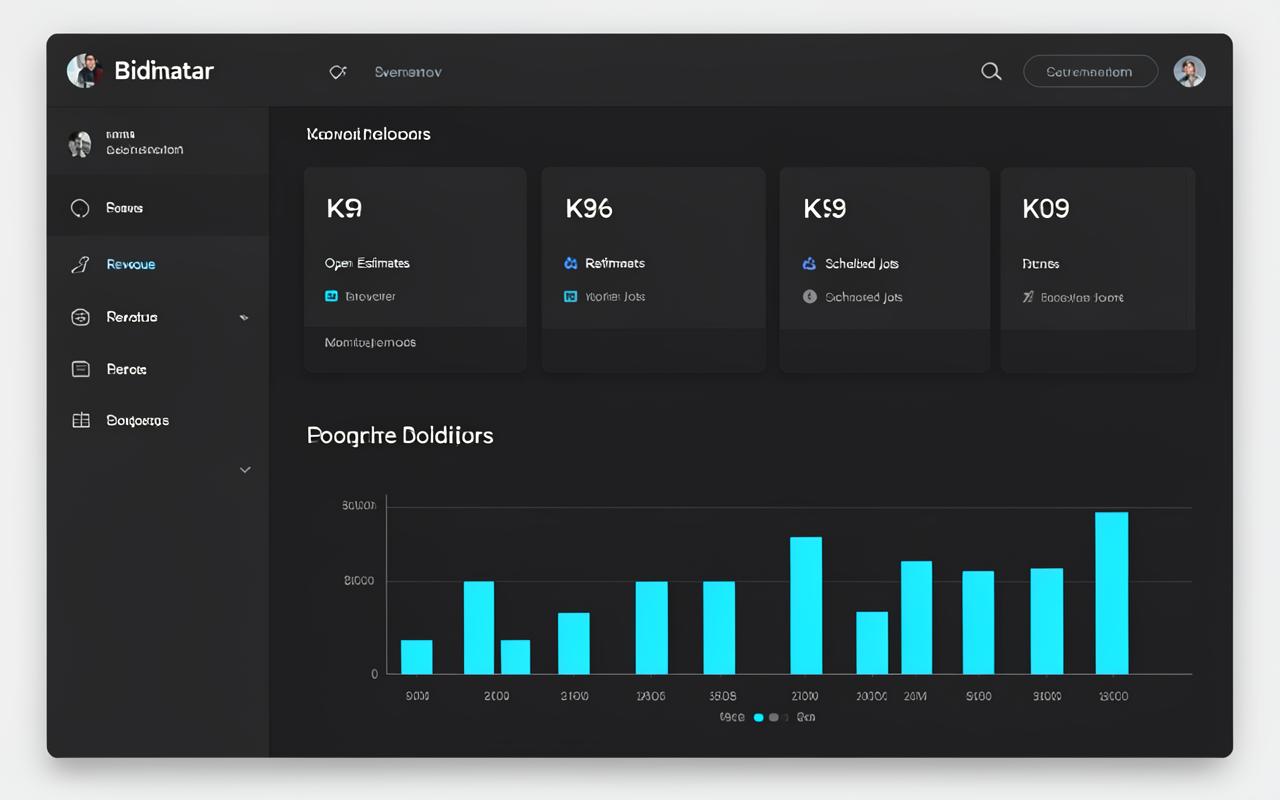
Dashboard
Know where the money is — at a glance
Revenue, open estimates, jobs on the calendar, and what you're still owed, all on one screen the moment you log in.
- Open estimates and their status
- Scheduled jobs for the week
- Outstanding invoices and payments
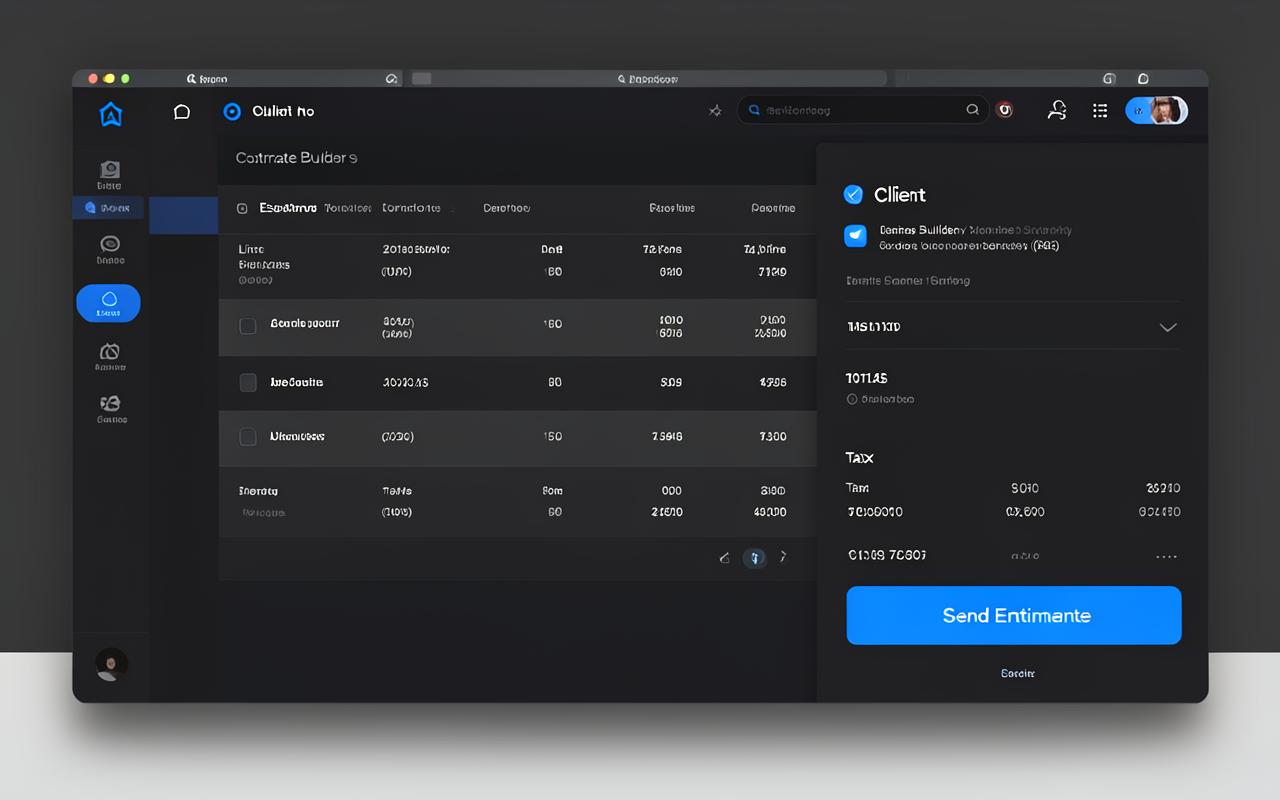
Estimates
Send a professional estimate from the driveway
Start from a template or let the AI draft the line items, adjust the pricing, and send it before you pull away from the job.
- Reusable templates per job type
- AI-drafted line items
- One click from estimate to job
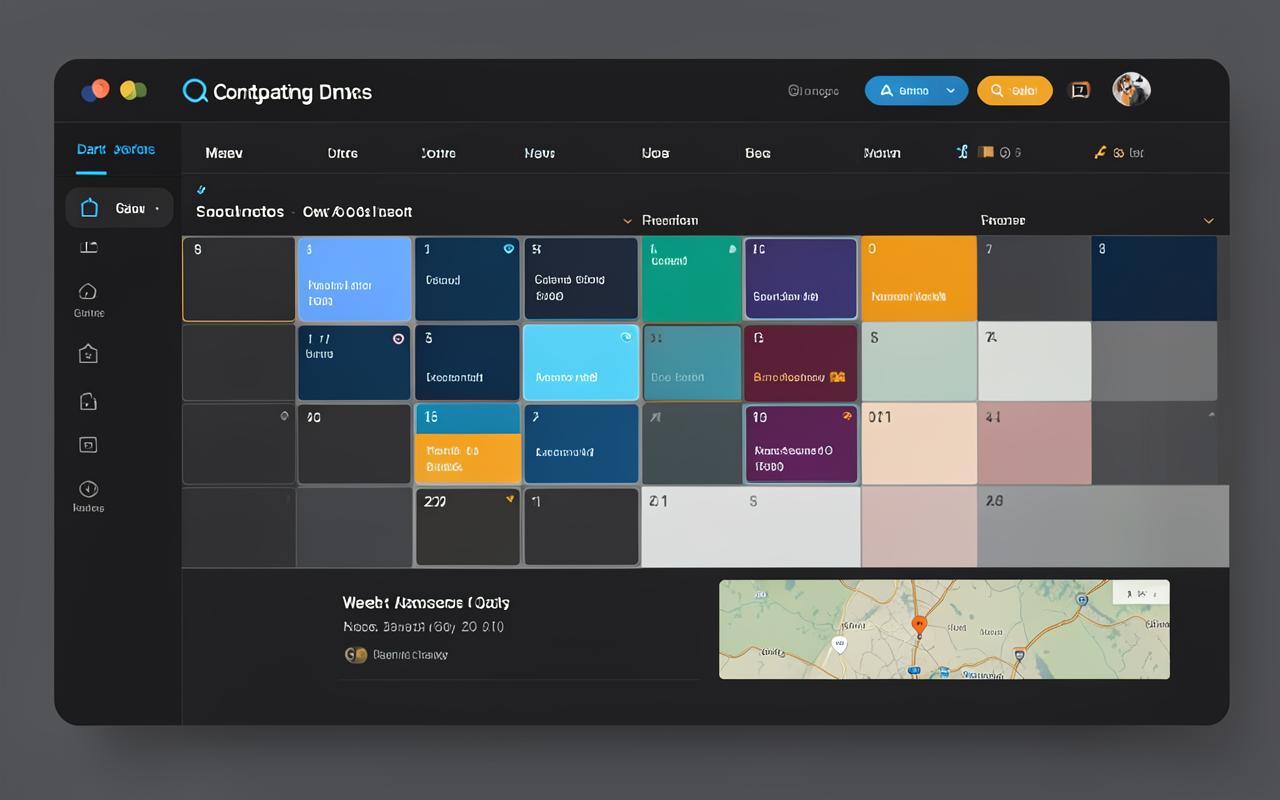
Scheduling
One calendar the whole crew works from
Accepted work drops onto the calendar tied to the real job record, so the crew, the dates and the details never drift apart.
- Drag jobs onto the week
- Assign the crew per job
- Dates tied to the job record
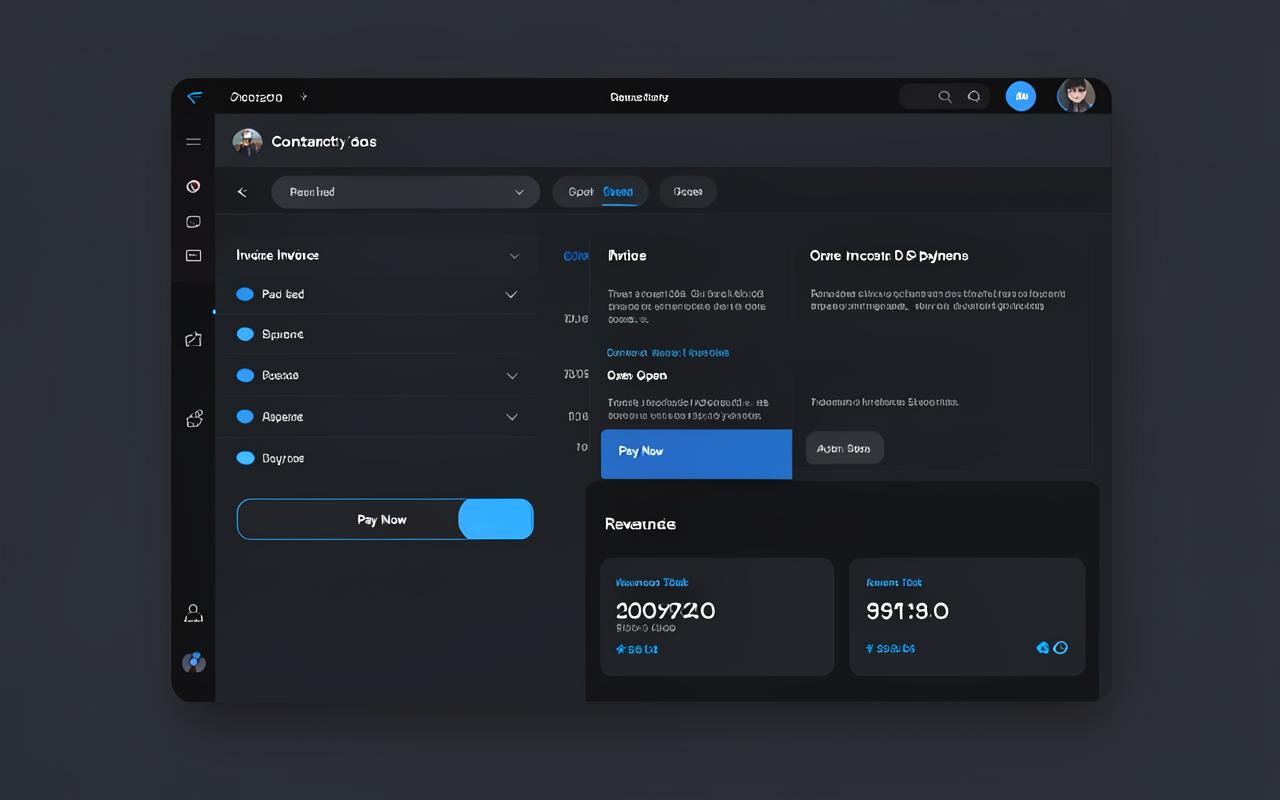
Invoicing & payments
Invoice from the job, get paid by card
Bill straight off the completed job, take card payments in the customer portal, and see exactly who still owes you what.
- Invoice from the job record
- Card payments in the portal
- Clear paid / unpaid view
$1,500 one-time payment · no monthly fees
- 7-day money-back guarantee
- Instant access after checkout
- Secure checkout
The maths
A stack of subscriptions, or one platform you own
Most contractors end up paying several separate monthly tools that don't talk to each other. Business Edition covers the same ground in one place, for one payment.
The usual way
A separate subscription for each piece
- Estimates & proposals — its own monthly bill
- Contracts and e-signatures — its own monthly bill
- Client CRM and history — its own monthly bill
- Scheduling & crew assignment — its own monthly bill
- Invoicing and card payments — its own monthly bill
- Customer portal — its own monthly bill
- Job costing & profit tracking — its own monthly bill
- AI estimating and follow-up help — its own monthly bill
Separate logins, data re-typed between apps, and a bill that arrives again every month for as long as you're in business.
Business Edition
All of it, in one platform you own
- Estimates & proposals — included
- Contracts and e-signatures — included
- Client CRM and history — included
- Scheduling & crew assignment — included
- Invoicing and card payments — included
- Customer portal — included
- Job costing & profit tracking — included
- AI estimating and follow-up help — included
Lifetime access with free updates. No monthly fee for Business Edition, ever.
$1,500 one-time payment · no monthly fees
- 7-day money-back guarantee
- Instant access after checkout
- Secure checkout
Comparison is illustrative and based on the categories of software this replaces — it is not a quote of any other company's pricing.

The offer
Let's review — here's exactly what you're getting today
- Unlimited professional estimates & proposals
- Reusable estimate templates for every job type
- Contracts with legally binding e-signatures
- Invoicing with online card payments
- Job scheduling, calendar & crew assignments
- Branded customer portal for approvals and payments
- Job costing and profit tracking per job
- Unlimited clients, jobs and documents
- Change orders and add-ons handled in the same job
- Photos, files and notes attached to each job
- Works on phone, tablet, laptop — nothing to install
- Import your existing client list
- Step-by-step onboarding checklist
- Email support from real humans
- Free product updates for life
- First month of Managed Services included
- One-time payment — no monthly fees, ever
- 7-day money-back guarantee
Rent that same set of tools month by month and you're looking at roughly $2,400–$4,800 a year, every year. Business Edition is $1,500 once.
Add the AI crew whenever you want it
Business Edition works fully on its own. These are optional monthly extras you can start or cancel at any time — nothing is switched on without you.
- Managed Services after month one ($25/mo, optional) — includes the full AI assistant: estimate search, email follow-ups, reminders, template & line-item builders, new-client auto assist, jurisdiction detection, and property detail search
- AI Add-On only ($9.95/mo, optional) — if you just want the AI assistant without Managed Services
Business Edition
$1,500one-time payment
Compare that to $200–$400/month for the subscription stack it replaces. Business Edition pays for itself in under six months — then it's free, forever.
$1,500 one-time payment · no monthly fees
- 7-day money-back guarantee
- Instant access after checkout
- Secure checkout
100% risk free
7-day money-back guarantee
Take Business Edition for a real spin on a real job. If it doesn't earn its keep in the first week, email us and we'll refund every cent — no questions, no forms, no hard feelings.
P.S. You know how this goes. You've paid for tools that promised the world and delivered another login to forget. If you're a little skeptical, good — you should be.
So test it on your next bid. Build the estimate, send the contract, invoice the job. If it doesn't save you time and money in the first week, tell us and you get your money back. The only thing you can't get back is another year of subscription payments.
$1,500 one-time payment · no monthly fees
- 7-day money-back guarantee
- Instant access after checkout
- Secure checkout
What contractors say
Built from the feedback of people who swing hammers
Placeholder examples — not real customer reviews. Real quotes and photos will replace these before launch.
“I cancelled three subscriptions the week I switched. Estimates that used to take an evening now take twenty minutes.”
“Clients sign the contract from their phone before I've left the driveway. That alone changed my close rate.”
“Scheduling, invoicing, payments — it finally all lives in one place. My office manager sends me thank-you notes.”
$1,500 one-time payment · no monthly fees
- 7-day money-back guarantee
- Instant access after checkout
- Secure checkout
FAQ
Questions, answered
Is this really a one-time payment?
Yes. $1,500 once gets you lifetime access to Business Edition, including product updates. Optional add-ons (AI usage, Managed Services) are the only things that bill monthly, and both are off by default.
How do I get access after I buy?
Checkout is handled securely by our payment partner. Right after purchase you'll receive a branded activation email with a single-use link to create your account — usually within a couple of minutes.
What happens after my first month of Managed Services?
Your first month is included. After that it continues at $25/month only if you choose to keep it — cancel anytime from your account settings and Business Edition keeps working either way.
What can the AI assistant do?
It can search your estimates by conversation, draft follow-up emails, offer discounts, set reminders, build templates and line items, auto-assist new clients, schedule appointments, and pull property details and jurisdiction info before you bid.
Can I import my existing clients and estimates?
Yes. You can import clients from a spreadsheet, and our onboarding checklist walks you through recreating your estimate templates so your pricing carries over.
What if it doesn't work for my business?
You're covered by the 7-day money-back guarantee. If it's not a fit, contact support within 7 days of purchase for a full refund.
Does it work on my phone?
Yes — the whole platform is mobile-friendly, so you can build estimates, check the schedule, and send invoices from the job site.

Stop renting your tools. Own them.
$1,500 one-time payment. Lifetime access, free updates, and a 7-day money-back guarantee.
$1,500 one-time payment · no monthly fees
- 7-day money-back guarantee
- Instant access after checkout
- Secure checkout